BookingPilot Housekeeping
Skip to content
BookingPilot

Built for the work, not the demo

Ten modules, one login, zero add-on maze. Everything below is live in the product today, and each block tells you which plan it ships with.

Front desk

The whole stay on one timeline

Every reservation sits on a calendar the whole team shares. Drag a booking to a new room or date, check guests in and out, and see what the day holds.
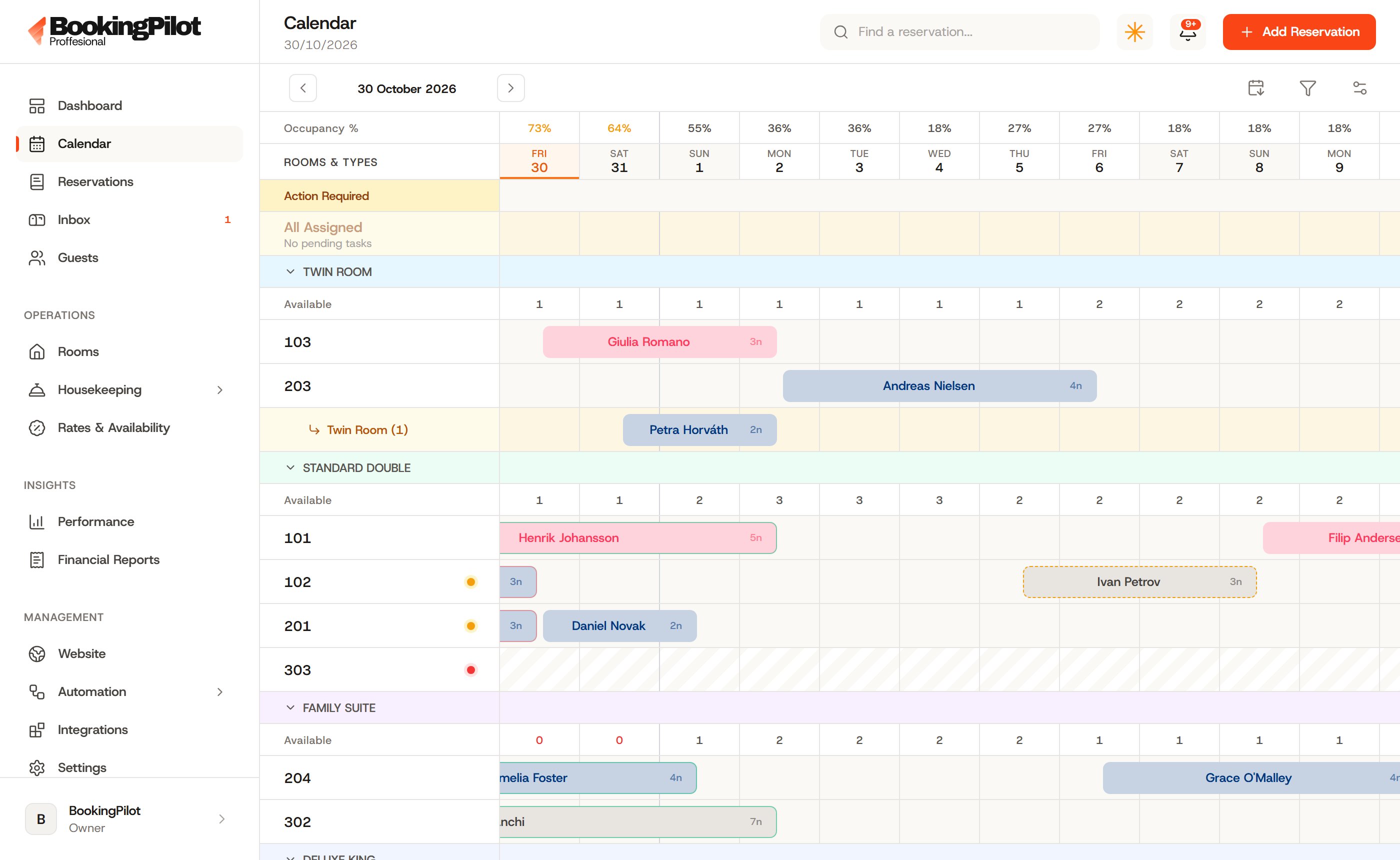
BookingPilot timeline calendar with drag-and-drop stays
Timeline & room moves

Drag a stay to a new room or date. Check-ins, check-outs, cancellations and no-shows are one click on the reservation.

Guest directory

Stay history, notes and blacklist flags per guest. Returning guests are recognized the moment they book again.

Rooms & rate plans

Room types with their own rate plans and availability. Set a price once, it reaches the desk and every channel.

Pre-check-in links

Each reservation gets a secure link for details and documents, so check-in at the desk takes seconds.

Direct bookings

Commission-free stays on your own site

Your property gets a bookable site on its own BookingPilot address. Set the rules once and the engine prices every direct stay to keep the margin the OTAs would have taken.

Tagline, welcome text, photos and amenities per room type
Live preview on desktop, tablet and phone widths as you edit
Connect your official website domain in one step
Direct rate rulesdays + percent, no spreadsheets
Book-direct member rateA standing discount for guests who book your own site instead of an OTA.
Early-bird windowReward guests who commit weeks out. Set the window in days and the discount in percent.
Last-minute fill rateDrop the price automatically inside the window you choose to fill leftover rooms.
Long-stay discountWeekly and monthly pricing for the stays that keep occupancy steady.
Your own addressEvery property gets a bookable site on its own bookingpilot.al address, connectable to the website you already run.
Channels

Sell everywhere without overselling

One connection keeps Booking.com, Airbnb, Expedia and the rest aligned. Change a price or close a room once and every channel follows.
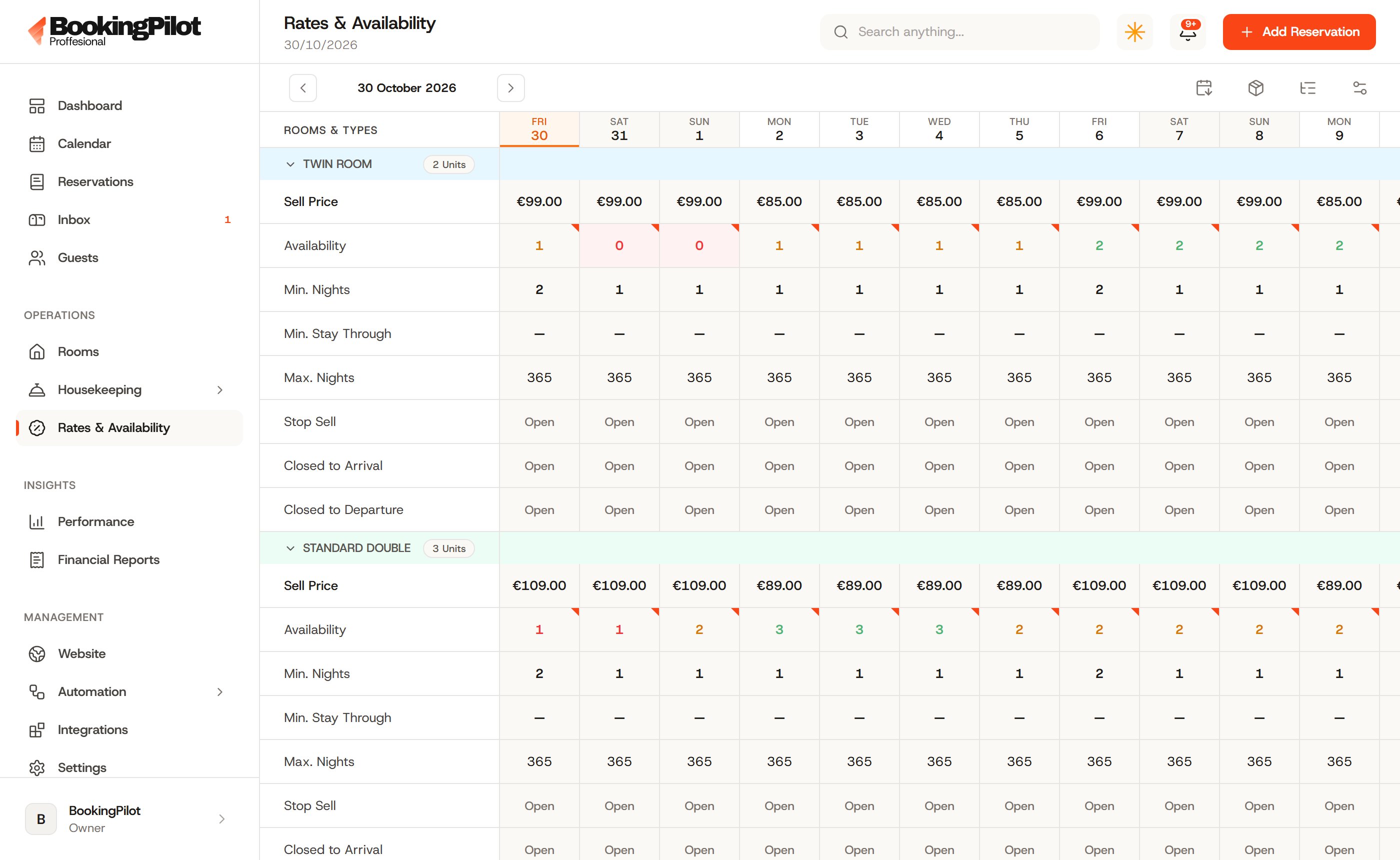

Two-way sync of rates, availability and restrictions
Bookings land in your calendar with the channel attached
Upcoming reservations import automatically when you connect
Per-channel markup so each OTA can carry its own commission
See the channel manager
Rate plans and availability managed in BookingPilot
Booking.com
Booking.com
Airbnb
Airbnb
Expedia
Expedia
Agoda
Agoda
Trip.com
Trip.com
VRBO
VRBO
Hopper
Hopper
eDreams
eDreams
Emerging Travel Group
MakeMyTrip
MakeMyTrip
Traveloka
Traveloka
+64 more channels

Connectivity runs through a certified channel partner. Rates, availability and bookings sync both ways, and BookingPilot takes nothing extra for it.

Guest inbox

Every conversation in one thread

OTA and direct messages land in a single inbox, attached to the guest and the reservation. Routine questions get an AI-assisted draft; you check it and send.
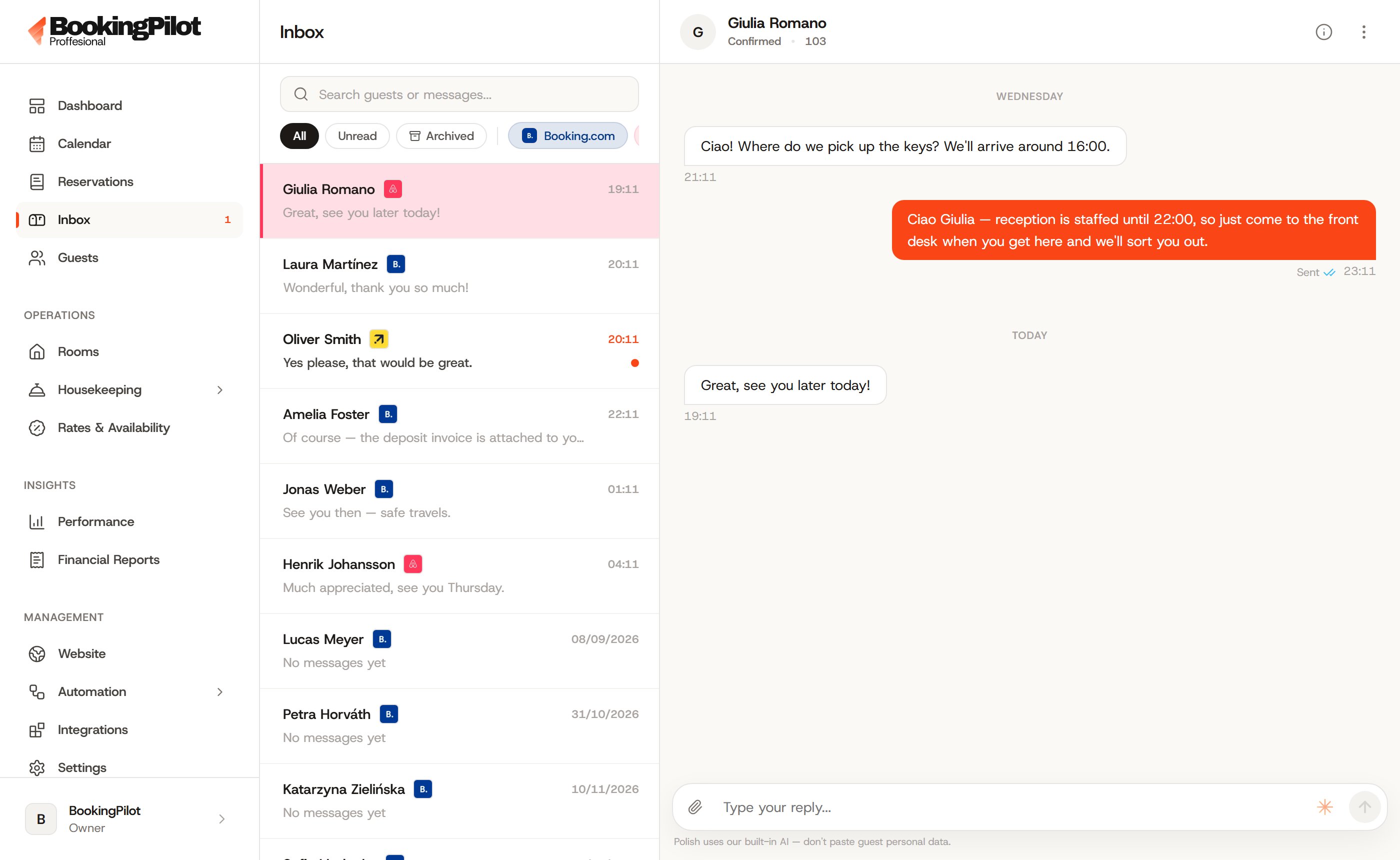
Booking.com, Airbnb and direct email in a single thread per guest
Every message attached to the reservation it belongs to
AI drafts the routine reply, you check it and send
A template library keeps the routine answers consistent
See the guest inbox
The unified guest inbox in BookingPilot
01
Every channel lands in one thread

Booking.com, Airbnb and direct email arrive in a single conversation per guest, attached to the reservation it belongs to.

02
Context sits beside the chat

Dates, room, balance and stay history are one glance away, so nobody asks the guest what they already told you.

03
Reply with a template or an AI draft

Routine questions get a drafted answer in your voice. You check it, edit it, and nothing sends itself.

Automations

The desk that works while you sleep

Set the messages every stay needs once. BookingPilot queues them for the right moment, and the whole queue stays inspectable: edit, reschedule or cancel any send before it goes out.

Trigger 1
Booking confirmed

Confirmation email and deposit invoice go out the moment a stay lands.

Trigger 2
Before arrival

Pre-check-in link and arrival instructions, timed to the day you choose.

Trigger 3
Check-in day

Door codes, Wi-Fi details and an open-balance reminder if one is due.

Trigger 4
After checkout

Thank-you note, review request and the invoice for their records.

Templates are written per language so guests read what they understand, and every scheduled message waits in a queue you can open before it sends. Nothing goes out silently.

AI assistants

Help that already knows the job

Two assistants live inside the dashboard: one for daily property work, one for the numbers. Ask a question, get a working answer, and nothing reaches a guest without you.

Operations assistantDaily work
Answers questions about the day at the property
Drafts guest replies and summarizes threads
Unlimited chats inside the dashboard
Financial specialistNumbers
Revenue, occupancy and ADR analysis on demand
Tax and accounting logic for the books
A second opinion on rates and channel mix
Draft-only by design. The assistants never message a guest, change a price or touch a reservation without a human click.
Housekeeping

Purpose-built for the people who clean

A separate mobile app your housekeeping team actually carries. Simple enough to learn on a shift, live enough that the desk stops making phone calls.
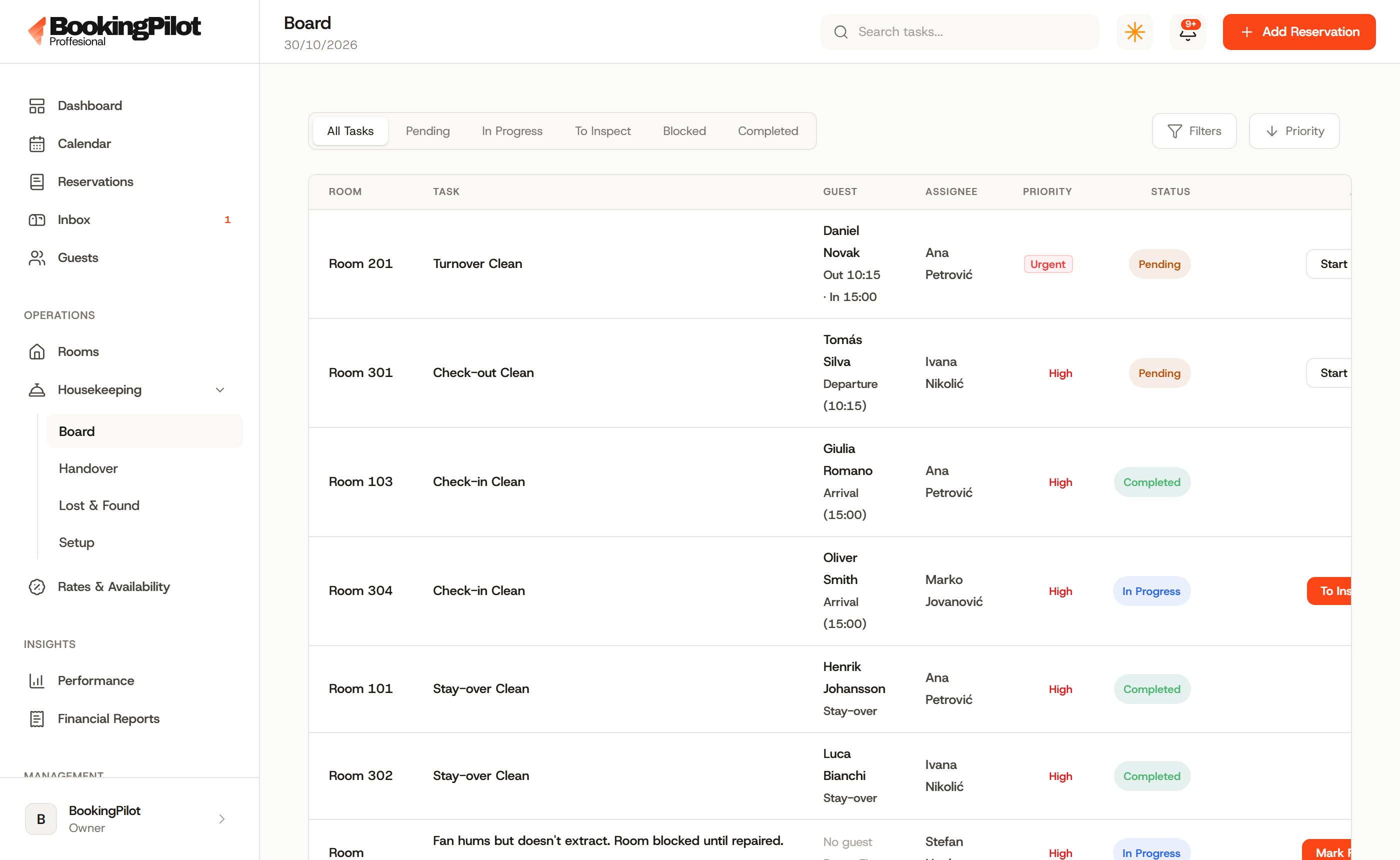
Per-room task boards with live clean, dirty and inspection status
Assignments, shift schedules and day handovers in one place
Lost & found and supply notes tracked per room
Housekeepers never see the back office; the desk sees progress live
See the housekeeping app
The housekeeping staff app showing room task boards
The staff app in its own language: all 112 of them
AfrikaansAkanShqipአማርኛالعربيةArmenianAssameseazərbaycanBambaraBelarusianবাংলাBhojpuribosanskiБългарскиBurmesecatalàCebuano中文hrvatskičeštinadanskDivehiNederlandsdzEnglisheestiffFilipinosuomifjFrançaisGeorgianDeutschΕλληνικάGuaraniગુજરાતીHaitian CreoleHausaעבריתहिन्दीmagyarIcelandicIgboIndonesiaIrishItaliano日本語Javaneseಕನ್ನಡқазақ тіліKhmerKinyarwanda한국어KurdishKyrgyzLaolatviešuLingalalietuviųLuxembourgishМакедонскиMaithiliMalagasyMelayuമലയാളംMalteseमराठीMongoliansrpski (Crna Gora)NepalinorskNyanjaOdiaOromoPashtoفارسیpolskiPortuguêsਪੰਜਾਬੀQuechuarnRomânăРусскийSrpskisgShonaسنڌيSinhalaslovenčinaslovenščinaSomaliSouthern SothoEspañolssKiswahilisvenskaTajikதமிழ்తెలుగుไทยTigrinyaTswanaTürkçeTurkmenУкраїнськаاردوo‘zbekTiếng ViệtWolofXhosaYorubaisiZulu
Payments

Money in, tracked properly

Deposits, balances and refunds recorded against the reservation they belong to. The payment story of a booking is always one click away.
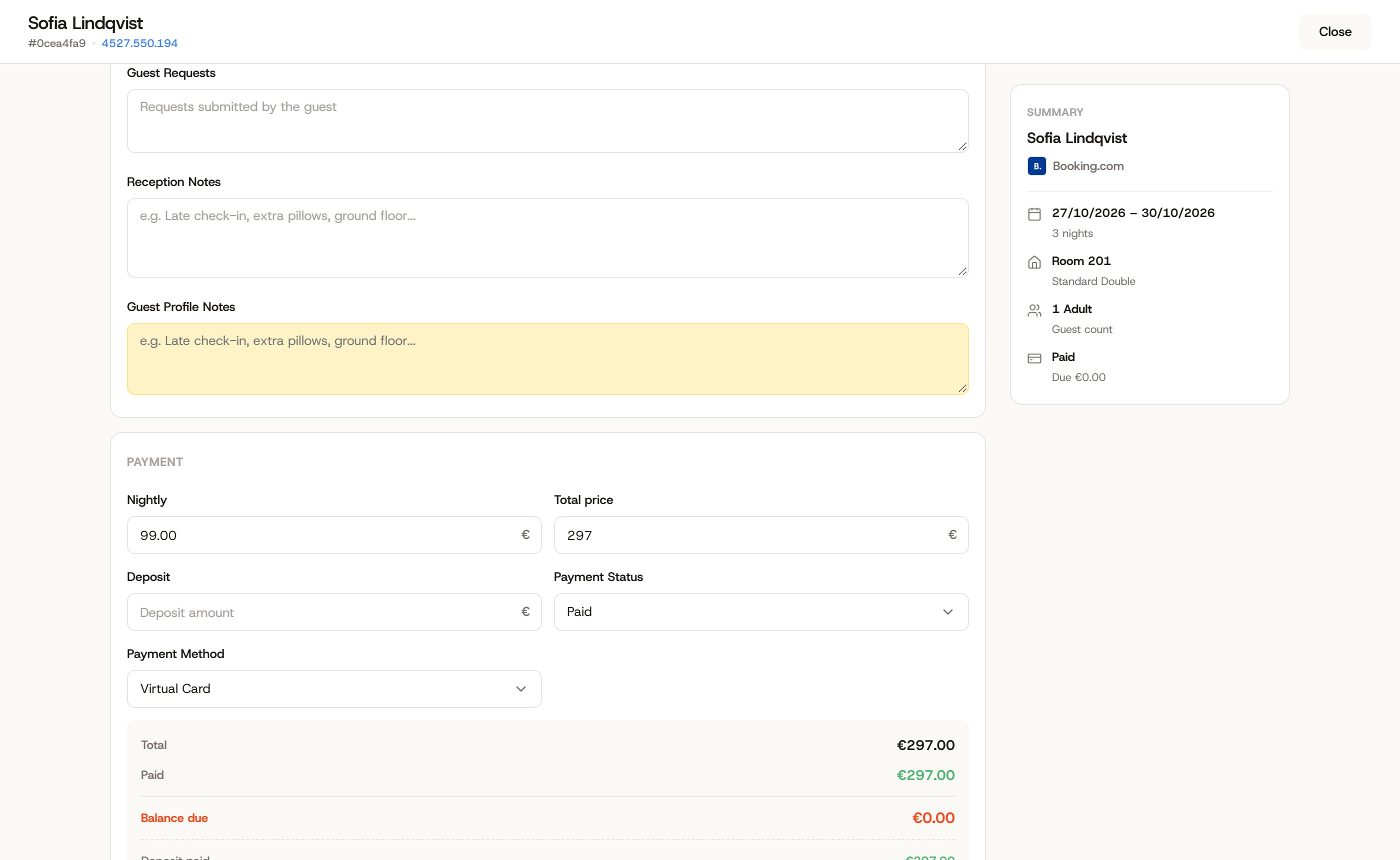
Record payments and deposits against each reservation
Email a deposit invoice when you want money before arrival
Paid, due and outstanding amounts visible on the booking
Refunds recorded with a full paper trail for disputes
See payments in detail
A reservation folio with deposits, payments and balance in BookingPilot
Deposits & invoices

Request money before arrival with a deposit invoice your guest can pay against.

Refund trail

Every refund is recorded on its reservation, with the full payment history beside it.

Encrypted card vault

Card details stored encrypted and masked, with an audit log of who viewed or changed them.

Reports

Numbers the owner actually reads

Occupancy, ADR and revenue by channel, updated as the desk works. Export a clean file for the accountant at month end.
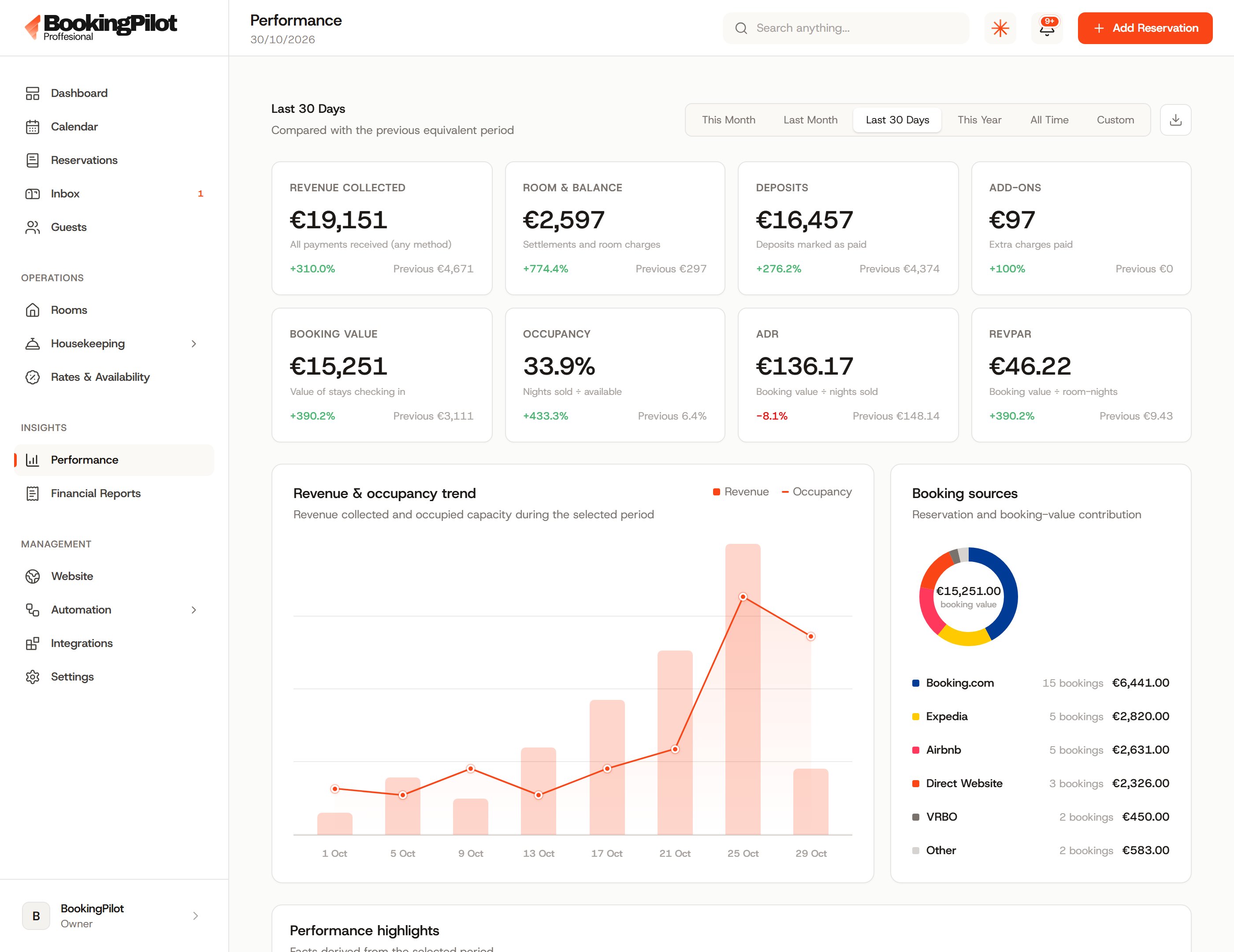
Occupancy, ADR and revenue broken down by channel
Financial reports built from real reservation and payment data
An activity log across the property for accountability
Exports your accountant can open without calling you first
Occupancy and revenue reports in BookingPilot
Occupancy & pace
Rooms filled, day by day
ADR & revenue
What each sold night earns
Channel mix
Where the bookings come from
Exports
CSV and PDF your accountant opens
Team and control

Everyone gets exactly their job

Five roles cover the whole property, and granular permissions decide what each one can touch, tuned per property without filing a ticket with us.

Owner, admin, manager, front desk and housekeeping out of the box
Housekeepers only ever see the staff app, never the back office
Every permission enforced server-side, not just hidden in the UI
Session inventory with per-device sign-out

Run the whole property from one login

Create your account, add your first property, and see the calendar fill itself.